The Songwriting App Built for the Moment Inspiration Strikes
Song Cage is the songwriting tool for everything that happens before you hit record. Start anywhere — a chord progression, a melody, a line of lyrics — and the rest follows. Experiment freely, learn music theory as you go, and get the song idea down before it fades.
Free tier available · No credit card required
See it in action
No install needed. Try the actual app — chord palette, timeline canvas, word tools, all working live.
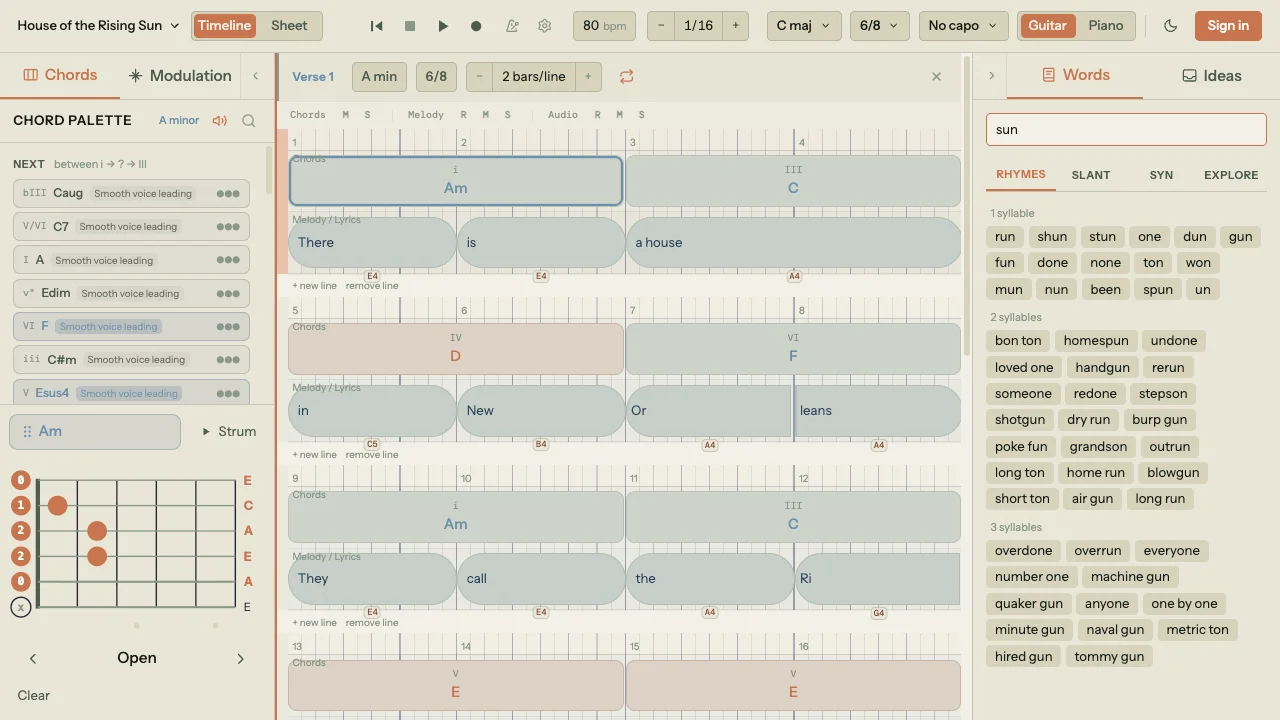
Song Cage is a full desktop songwriting DAW — chord palette, timeline canvas, guitar voicings, and word tools all in one place. Open songcage.com on your computer for the complete experience.
You're using three tools to do one job — and losing ideas in the gaps
You figure out the chords
Built for recording or scoring — not songwriting. No lyric tools, no chord theory suggestions, no way to understand why a progression works or where it could go next.
You capture the idea
The words land in one place, the melody in another, the chords somewhere else. You come back two days later and the magic is gone — because nothing was connected.
You search for the right word
Switching apps mid-session kills flow. By the time you find the rhyme and get back, you've lost the thread of where the song was going.
Song Cage is the songwriting tool that replaces all three — a chord palette with guitar and piano voicings, a lyric workspace with built-in rhyme finder, and music theory that connects them — on a single DAW-style canvas built to capture song ideas fast.
Capture your song idea. Then give it everything.
Song Cage has two moves — capture the idea before it fades, then develop it with tools that understand your song.
Capture it
Start anywhere — a chord progression, a melody, a line of lyrics. No setup, no required order. Just get the idea into the canvas before it disappears.
Chords and melody, wired together
Start with chords and lock your melody to the progression — notes snap to chord tones as you write. Start with a melody and the chord palette reshapes around it, surfacing the chords that fit what you've already played. Change either one and the other responds.
Lyrics wired to rhythm and meaning
Write lyrics first and build the rhythm and melody around them — syllables sit on beat positions, each one carrying its own pitch. Or lay down chords and a melody first and write words that land exactly where they need to. Click any word for rhymes, slant rhymes, and synonyms grouped by syllable count.
Theory that shows you where to go
Every chord available in your key — diatonic, borrowed, secondary dominants — with extensions that improve voice leading. A modulation panel that maps pivot chord routes between any two keys. You don't need to know the theory to use it — and you'll learn it just by writing.
Everything a songwriter needs.
Nothing they don't.
How Song Cage compares to other songwriting tools
Every other tool handles a piece of the songwriting process. Song Cage handles all of it — chord progressions, music theory, lyrics, and a rhyme finder — on one connected canvas. See how it stacks up.
| Song Cage | DAWs (Logic, GarageBand) | Hookpad | Guitar Pro | Notes App | RhymeZone | |
|---|---|---|---|---|---|---|
| In-key chord palette | ✓ | Chord Track (Logic) | ✓ | Library only | — | — |
| Context-aware chord suggestions | ✓ | — | Basic | — | — | — |
| Guitar & piano voicings | ✓ | — | — | ✓ | — | — |
| Melody input & snap to chords | ✓ | MIDI / audio (Logic) | ✓ | — | — | — |
| Modulation panel & pivot chords | ✓ | — | — | — | — | — |
| Learn why chords work | ✓ | — | Separate book | — | — | — |
| DAW-style drag & drop canvas | ✓ | ✓ | Limited | — | — | — |
| Lyric writing workspace | ✓ | — | Basic | — | ✓ | — |
| Rhyme finder & word tools | ✓ | — | — | — | — | ✓ |
| Speed-first idea capture | ✓ | Heavy UI | Moderate | Heavy UI | Text only | — |
| Collaboration & sharing | ✓ | File export only | — | File sharing | ✓ | — |
| Price | $12/mo all-in | Free–$200 | $7.99 + $14.99 AI | ~$70 one-time | Free | Free |
What songwriters are saying
“I used to keep Guitar Pro, a notes app, and RhymeZone open simultaneously. Song Cage replaced all three. The modulation panel alone saved my last EP — I had no idea how to get from Dm to F# until it just showed me the pivot chords.”
“The Word Tools are genuinely better than anything I've used. Slant rhymes grouped by syllable count means I'm never forcing a lyric to fit the rhythm — it just flows. This is the first songwriting tool that understands how lyrics actually work.”
“As a guitarist who's terrible at notation, this is everything. I can see the actual chord shapes, drag the blocks around like a DAW, and the borrowed chord library showed me colour I didn't know I had access to. Subscribed in 20 minutes.”
Frequently asked questions
How do I write chord progressions for beginners?
Song Cage is built for exactly this. Pick a key and the app shows every chord that fits — diatonic, borrowed, and secondary dominants — with guitar fretboard diagrams or piano voicings so you can actually play them. Tap any position on the timeline and the chord palette ranks suggestions based on the chord before it, the chord after it, and the melody notes at that beat — so you’re not guessing, you’re choosing from what actually works in context. Every chord is labeled by function, so you learn why it works as you use it. Start with a melody instead and the palette reshapes around what you’ve already written. No music theory knowledge required — you pick it up naturally just by writing.
Is there an app to write songs with chords and lyrics together?
That’s exactly what Song Cage does. Write lyrics in a familiar notepad-style sheet view with chords above the words, or switch to the DAW-style timeline where every syllable sits on the beat grid and carries its own melody note — both views share the same data. Click any word to see rhymes, slant rhymes, and synonyms instantly, or open the Explore tab to break through writer’s block — follow chains of semantically related words or generate unexpected pairings with the Word Collider. Change a chord and the melody guidance updates. Move a lyric block and its rhythm, syllable splits, and pitches move with it. Everything stays connected because it was never separate to begin with.
What’s the best app to capture song ideas fast?
Song Cage is built for exactly that moment — guitar in hand, idea in your head. Open the app, pick a key, and you’re writing in seconds. Start anywhere — a chord progression, a melody, a line of lyrics — there’s no required order and no setup screen. Record audio directly in-app so the melody doesn’t disappear. Capture chords on the timeline with guitar or piano voicings, write lyrics in the sheet view, and sketch a melody with notes that snap to chord tones. Everything you put down is connected, so when you come back later the idea is still whole — not scattered across three different apps.
Do I need to know music theory to use Song Cage?
Not at all — Song Cage teaches you as you write. Hover over any suggested chord and the app explains why it works: “Classic ii-V-I cadence,” “borrowed from Aeolian,” or “part of the I-V-vi-IV pop progression” — along with voice leading smoothness and how many of your melody notes are chord tones. The modulation panel shows named routes between keys with pivot chords and cadential patterns. You’re not memorizing theory from a textbook — you’re seeing it applied to your own song in real time. Over time you’ll need the suggestions less. That’s not a problem — that’s the point.
Simple, honest pricing
Full features on Free. No feature paywalls hidden three menus deep. Upgrade when you're ready.
Cancel anytime. No hidden fees, ever.
Start writing your next song — for free
Song Cage is free to start. No credit card, no setup, no friction. Join 400+ songwriters already capturing ideas faster with chords, lyrics, and music theory in one place.
Free tier available forever · Cancel any time